
InteleGates Guide
Gate Remote or Keypad Not Working? The Common Causes
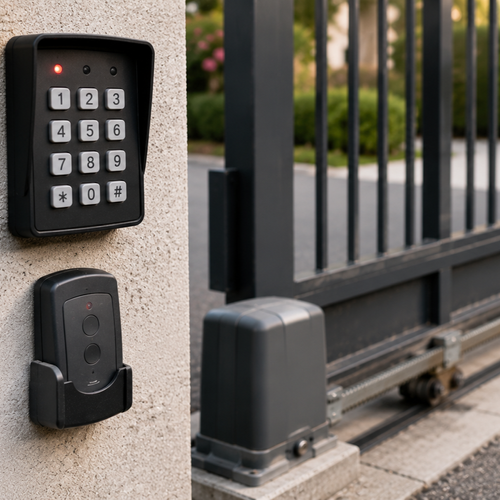
Quick Answer: A gate remote or keypad that stops working usually comes down to a few things: a depleted battery, lost programming, radio interference, limited range, a worn keypad, or a failed receiver or wire at the gate. Note which access methods still respond, then have a gate technician trace the signal from the device to the receiver and operator. That separates a device issue from a control-board, wiring, or power fault without guessing.
You press the remote at the gate, and nothing happens, or you punch your code into the keypad, and the gate just sits there. When your way in suddenly stops working, it's easy to assume the whole gate has failed — but often the gate is fine and the problem is in how you're telling it to open. Access devices like remotes and keypads have their own set of common, usually fixable faults, and a little testing quickly reveals whether the trouble is the device, the signal, or the gate's receiver.
The Device, the Signal, or the Receiver
A remote or keypad works by sending a signal to a receiver at the gate, which then tells the operator to move. A breakdown can happen at any point in that chain: the device itself (dead batteries, lost programming, damage), the signal between the device and the gate (interference, range), or the receiving end (a failed receiver, wiring, or power). Figuring out which link is broken is the key, and the fastest way to do that is to test your different access methods against each other.
Start With a Simple Test
Before anything else, try every way you have to open the gate: the remote, the keypad, a second remote if you have one, and any phone app or manual control. What works and what doesn't tells you a lot. If the keypad works but the remote doesn't, the problem is the remote. If one remote works and another doesn't, the dead one is the issue. If nothing works at all, the problem is likely at the gate — the receiver, power, or operator — rather than any single device.
Common Remote Problems
Dead or Weak Batteries
The most common reason a remote stops working is a depleted battery. A weak battery may work intermittently or only up close before failing entirely. A technician can confirm the battery and remote signal before moving on to the receiver or operator.
Lost Programming
Remotes are paired with the gate's receiver, and that pairing can be lost after a power surge, a battery change on some systems, a receiver reset, or a glitch. The remote may still be intact while the receiver no longer recognizes it. An authorized technician can confirm the pairing and restore the connection without disturbing the operator settings.
Interference or Range Issues
Remotes use radio signals, and those can be disrupted by interference from other devices, electrical noise, or nearby transmitters, and they only work within a certain range. If the remote works sometimes or only when you're very close, interference or a weakening signal may be the cause. Sometimes relocating the source of interference or addressing the receiver's antenna helps.
Common Keypad Problems
Dead Power or Batteries
Keypads need power too, either from batteries or a wired supply. A battery-powered keypad with a depleted battery, or a wired keypad that has lost power, simply goes dark or unresponsive. A technician can verify the keypad supply and its communication with the receiver before recommending service.
Worn, Damaged, or Weather-Exposed Buttons
Keypads live outdoors and take constant use, so the buttons wear out and the unit suffers from sun, moisture, and coastal salt air over time. Worn buttons may stop registering presses, and water intrusion can corrode the internals. A keypad where certain buttons don't respond, or that's visibly weathered, may need repair or replacement.
Lost or Incorrect Codes
Sometimes the code itself is the issue, such as a code changed or erased during a power event. The technician can confirm the keypad's stored credentials and restore authorized access through the site's normal access-control process.
Problems at the Gate
A Failed Receiver, Wiring, or Power
If no access method works, the problem is likely at the gate end. The receiver that picks up the remote and keypad signals can fail — often from power surges or, in coastal air, moisture and corrosion. Wiring to the keypad or receiver can be damaged, and a power problem at the operator’s end leaves everything unresponsive. These gate-end faults need a technician to diagnose and repair.
| Symptom | Likely cause | Technician focus |
|---|---|---|
| One remote dead, others/keypad work | Remote battery or pairing | Test the remote and restore authorized pairing |
| Remote works only up close / intermittently | Interference or range | Check the antenna, signal, and receiver |
| Keypad unresponsive or dark | Keypad power/battery | Test the keypad supply and wiring |
| Some keypad buttons don't register | Worn or weather-damaged keypad | Inspect the keypad for service or replacement |
| Nothing works at all | Receiver, wiring, or power at gate | Trace the operator-side fault |
Keep a spare set of remote batteries and know your gate's manual-release procedure. The two most common access failures — a dead remote battery and being locked out during a power issue — are also the two easiest to handle on the spot if you're prepared for them.
What to Try and When to Call
A technician can handle the device-level checks, confirm the remote or keypad battery and supply, compare the access methods, and verify the receiver's programming. Those checks separate a depleted battery or lost pairing from a receiver, wiring, or operator fault.
When no access method works, or when the issue traces to the receiver, wiring, or power at the gate, it's time for a technician. Those gate-end components include the operator's electronics and wiring, which are often degraded by surges or coastal moisture and require professional diagnosis. For a property where many people rely on the gate, restoring reliable access promptly keeps control and traffic flow intact.
Frequently Asked Questions
Why did my gate remote suddenly stop working?
The most common reason is a depleted battery, but a remote can also lose its pairing with the gate's receiver after a power surge or glitch. If other remotes or the keypad still work, the technician can isolate the fault to that remote. If nothing works, the issue is more likely at the gate-side receiver, power, or operator.
My keypad stopped working, but the remote still does — what's wrong?
If the remote works and the keypad does not, the fault is likely at the keypad or its supply rather than the operator. Common causes are a depleted battery, lost power, worn buttons, weather exposure, or a changed credential. A technician can test the keypad and determine whether it needs service or replacement.
Why does my remote only work when I'm close to the gate?
Working only at close range usually indicates a weak signal, often a dying battery or radio interference disrupting the signal between the remote and the gate's receiver. A technician can test the battery, receiver, antenna, and nearby electrical noise to identify why the range has changed.
Could a power surge affect my gate remote or keypad?
Yes. Power surges, including storms and coastal grid flickers, can erase the pairing between remotes or keypads and the receiver, and can damage the receiver itself. After a surge, a technician should test the access devices, receiver, control board, and surge protection before restoring service.
What if neither my remote nor my keypad works?
When no access method works, the problem is usually at the gate end rather than in any single device, most often a failed receiver, damaged wiring, or a power problem at the operator. Coastal moisture and power surges are common culprits for receiver failure. Have a gate technician trace the power, receiver, control board, and operator so the repair addresses the correct link.
Test First, Then Fix the Right Link
A gate remote or keypad that quits has broken one link in the chain from the device to the gate: the device, the signal, or the receiver. The technician's job is to compare the access methods, trace the signal, and inspect the receiver, wiring, and operator when the fault reaches the gate. InteleGates diagnoses the problem before recommending service or replacement.
Remote or keypad leaving you stuck at the gate? — Get your access controls diagnosed and repaired by gate specialists. InteleGates Inc. serves Los Angeles, Long Beach, Anaheim. Call (833) 468-4283.