
InteleGates Guide
Gate Control Board Repair: Common Faults
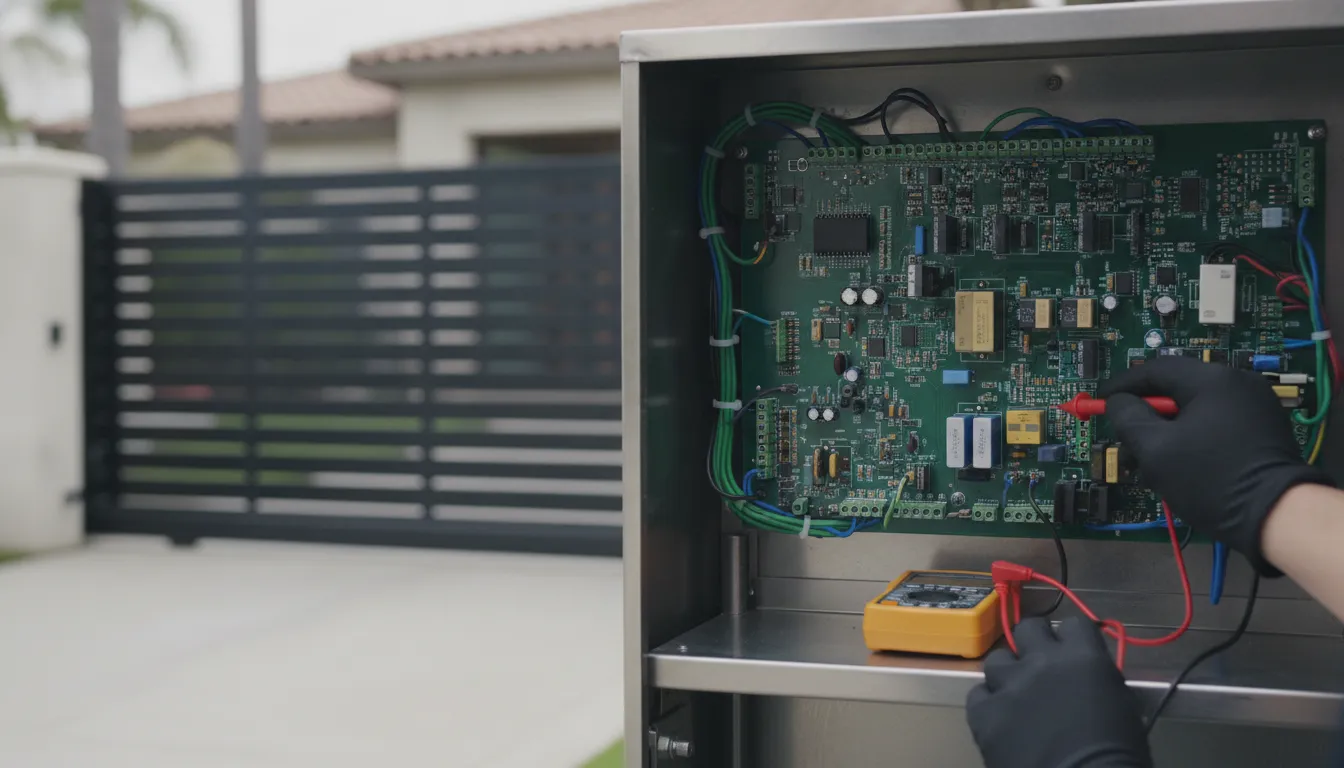
A gate that ignores every remote, stays open, or reverses for no clear reason often gets blamed on the motor. Many of those calls are really a control problem. Gate control board repair starts with the board that reads commands, watches safety devices, and tells the operator when to move. A failed board can look exactly like a dead motor, a bad remote, or a blocked sensor. The difference shows up only after someone tests the circuit, not after a part is swapped on a guess.
Request a control-board diagnosis
InteleGates works on existing electric gates and access systems across Los Angeles County and Orange County. The technician diagnoses the problem before recommending repair or replacement of a worn motor, sensor, control board, or track or chain component. Most gate problems can be diagnosed during the initial service visit. Repair time depends on the cause of the problem, parts availability, and the condition of the gate and operator.
What a Gate Control Board Actually Does
The control board is the operator's decision center. It sits inside the operator cabinet and connects the motor, limit switches, safety inputs, and access devices. A keypad code, a remote click, a phone-entry relay, or a vehicle loop all arrive as electrical signals. The board decides whether those signals are allowed to move the gate.
On a healthy system the sequence is simple. Power reaches the board. The board confirms that monitored safety devices are present and clear. An open or close command arrives. The board starts the motor in the correct direction and stops it when the limit says the leaf is fully open or closed. If any required input is missing or shorted, the board may refuse to run, reverse, or hold the gate open.
That is why a dark display or a repeating fault code is not the whole story. The board is also the place where a bad loop, a cut photo-eye wire, or a weak battery shows up. Replacing the board before those inputs are checked can leave the same symptom on a new part. A plain explanation of the travel sequence is in how an automatic gate opener works.
Symptoms That Lead to Gate Control Board Repair
No single symptom proves the board has failed. A pattern across inputs is more useful than one failed command. These are the patterns technicians treat as board suspects until testing says otherwise.
- Every access device fails together. Remotes, the keypad, and the entry phone all stop opening the gate at the same time, while each device still has power of its own.
- The gate runs in only one direction. It opens and will not close, or it closes and will not open, and the limit switches test normal.
- The operator hums or clicks and never travels. The board tries to start the motor, then drops the command. Motor windings and the supply still need to be ruled out.
- Fault codes repeat after a reset. A code returns as soon as the board boots, even with the gate leaf disconnected from the drive.
- Inputs read backward. A clear photo eye shows blocked, or an open limit shows closed, and the field wiring measures correctly at the device.
- Visible board damage. Burned traces, a swollen capacitor, corrosion at a connector, or a board that resets when the cabinet door is moved.
One dead remote is not this list. A single transmitter with a weak battery, or one keypad with a cut cable, fails alone. The board becomes the likely part when several independent commands fail the same way. Related motor clues, such as new grinding or partial travel, belong in the separate guide to electric gate motor warning signs.
Intermittent faults are the hardest calls
Heat, moisture, and a loose connector produce faults that vanish by the time a technician arrives. A board can run all morning and lock out in the afternoon sun. Coastal air in Orange County and inland heat in the Los Angeles basin both speed corrosion on exposed terminals. If the gate misbehaves only at a certain time of day, write down the time, the weather, and which command failed. That note is more useful than cycling the breaker before the visit.
How a Technician Separates a Board Fault From the Rest of the System
Diagnosis follows the command from the supply to the motor. Skipping a step is how a good motor or a good board gets replaced. The order below is the one that keeps those mistakes off the invoice.
- Confirm incoming power and the low-voltage supply. Measure at the board, not only at the breaker. A transformer, fuse, or charger can leave the board dark while the rest of the property has power.
- Read the display or diagnostic LEDs before disconnecting anything. Codes for loop errors, missing monitored devices, or battery faults name an input. They do not automatically name a dead board.
- Test the battery and charger. A depleted battery can block backup operation and, on some operators, throw a boot fault. The battery is a separate part from the logic board.
- Command the board from a known local input. A control wired at the cabinet bypasses remotes and phone entry. If that local input also fails, the access devices are no longer the prime suspect.
- Meter each safety input. Photo eyes, edges, and loops should change state when they are blocked and cleared. A wire that never changes is a field problem, even if the board reports it.
- Check limits and the motor circuit last. Limits that never change will stop travel on a healthy board. Only after limits, voltage, and inputs test good does a no-travel symptom point back at the board or the motor itself.
The same sequence separates a board fault from a motor that should be repaired or replaced. That motor decision is covered on its own in electric gate motor repair or replacement. Unusual humming or grinding during the test is logged as a motor or mechanical clue, not as proof the board is burned. More on those sounds is in electric gate motor noise.
What Each Test Result Usually Means
Property owners rarely see the meter readings. They do see the outcome. This table shows how a technician sorts the common results. It is a field guide, not a DIY procedure. Operator cabinets hold line voltage, and the wrong jumper can defeat a safety input.
| What the test shows | More likely source | What happens next |
|---|---|---|
| No voltage at the board power terminals. | Breaker, fuse, transformer, or charger. | Restore supply and retest before condemning the board. |
| Board dark, correct voltage present, fuse on the board open. | Board, or a short on a connected harness. | Isolate harnesses. Then repair or replace the board if the short is on the board. |
| Code names a loop, edge, or photo eye. | That device or its wiring. | Repair the named input and clear the code before any board swap. |
| Local open and close work. Remotes and the keypad do not. | Receiver, keypad, phone relay, or their wiring. | Repair the access device, not the main logic board. |
| Every input tests normal and the motor never starts. | Control board or motor circuit. | Compare motor readings with the board output. Then replace only the failed part. |
| Board runs until the cabinet is touched or warmed by the sun. | Cracked solder, loose plug, or heat-sensitive component. | Reseat connections. Then replace the board if the fault follows the board. |
A code that names an exit loop, shadow loop, or interrupt loop is a detector or loop-wire problem until the loop is proven good. Those devices are part of the safety and vehicle-detection system, which is a different job from board replacement. InteleGates covers that work on the loop and underground sensor service.
Why Safety Devices Can Make a Good Board Look Failed
Modern vehicular gate operators monitor entrapment-protection devices. If a required monitored sensor is missing, shorted, or not the listed type, the operator can refuse to run. That behavior is a safety lockout, not a burned processor. According to DASMA's overview of UL 325 for gate operators, the standard sets entrapment-protection criteria for each class of operator, along with alarm and installation duties for the installer.
In practice, a slide or swing operator may demand a minimum set of independent monitored devices in each entrapment zone. A photo eye knocked out of alignment, an edge sensor with a dead battery, or a receiver unplugged during landscaping will hold the gate. The board is doing the job the standard requires. Replacing it does not restore a missing sensor.
Sensor type, placement, and alignment belong to a different article. Use automatic gate safety sensors for that guide, and UL 325 gate safety requirements for what property owners should expect from a compliant operator. This article only uses those devices as inputs a technician must clear before calling the board failed.
The same caution applies to battery backup. A board can run on utility power and then refuse to move after an outage because the battery or its harness has failed. That is a power-path fault. Backup behavior is explained in gate opener battery backup, not as a control-board rebuild.
Access Devices Fail on Their Own
Remotes, keypads, telephone entry, and RFID readers all land on the board, but they are not the board. A receiver can lose its antenna. A keypad can stick or lose its cable. A telephone-entry relay can stay closed and hold the gate open. Each of those faults leaves the logic board healthy.
The separating test is the local input at the cabinet. If a switch at the operator opens and closes the gate, the board and motor can carry out a command. The failed path is then the access device that could not send one. InteleGates services those devices separately, including gate remote controls and the broader access control system.
Do not program a stack of new remotes before that test. Adding transmitters to a receiver that never reaches the board only adds parts. If every previously working remote fails on the same day, ask whether the receiver or the board input died, and let the technician meter it.
When Professional Diagnosis Is the Right Next Step
Call for service when the gate will not complete a cycle. Call when it reverses or stays open without a visible obstruction. Call when a fault code returns after a power reset. Also call if the cabinet shows corrosion, burned components, or a breaker that trips again after one reset. Those are not owner adjustments.
Leave the operator powered as you found it if that is safe. Do not jumper safety terminals to see if it runs. Defeating a monitored input can let the gate move with a person or a vehicle in the path. Take a photo of the display and of any loose wire, then stop. Cycling the breaker many times can hide an intermittent code that the technician needed to see.
Regular office hours are Monday through Thursday, 8:30 AM to 5:00 PM, and Friday, 8:30 AM to 3:00 PM. Emergency gate service is available Sunday through Friday for qualifying emergencies. Call for availability. For a gate that is blocking a driveway or a commercial entrance, the electric gate system repair page is the service path. Ongoing inspections that catch loose plugs and moisture before a board fails are covered under electric gate system maintenance.
Call toll free at (833) 468-4283
Frequently Asked Questions
Does a gate that ignores every remote need a new control board?
Not by itself. If the keypad and a local switch at the operator still work, the receiver or the remote is the likely fault. The board becomes the suspect when several different commands fail and the supply, limits, and safety inputs test normal.
Can a safety sensor stop the gate even when the board is good?
Yes. Operators built to UL 325 monitor entrapment devices and can refuse to run when a required sensor is missing, blocked, or the wrong type. That lockout is corrected by repairing the sensor or its wiring, not by replacing a board that is reporting the fault correctly.
What should I tell the technician before a visit?
Note which commands fail, whether the gate fails open or closed, any code on the display, and whether the problem follows heat, rain, or a recent power outage. Leave the wiring as you found it and do not jumper safety terminals.
Will a new control board fix a slow or noisy gate?
Usually no. Slow travel, grinding, and partial stops often come from the motor, the gate leaf, or the track or chain. A board replacement is considered only after those parts and the safety inputs have been tested.
Who services gate control boards in Los Angeles and Orange County?
InteleGates diagnoses and repairs existing electric gate operators and access equipment across both counties. Call toll free at (833) 468-4283, or use 310-955-1777 for Los Angeles and 714-988-0095 for Orange County.